Website HTML slideshow software
New version of Extreme Thumbnail Generator was released with a new feature that allows creating HTML thumbnail galleries with slideshow. It is only a matter of a single mouse click now - simply check the Enable slideshow box in the gallery options and your gallery has it. Take a look at the screenshot below.
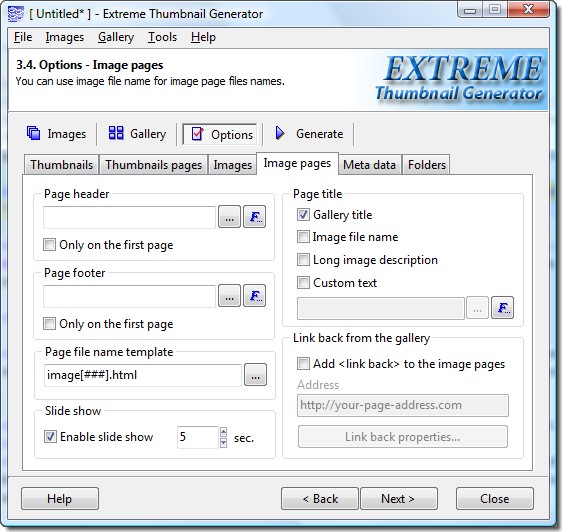
Please note that you can set the slideshow timeout yourself. Just type the number of seconds you want.
Download and try Extreme Thumbnail Generator for free
How does website HTML slideshow work
Slideshow in Extreme Thumbnail Generator is a JavaScript that shows next image page after slideshow timeout elapses. When the last image page is reached - slideshow continues from the first image page. Usually a new image or text link is added to the image page navigation which allows to start and stop the slideshow. If user clicks a link that changes the image page (for example Next image button or First image button), the slideshow is stopped. You can take a look at the sample HTML slideshow gallery here.
One important thing to notice here - if your gallery does not have image pages (thumbnails are linked directly to full-size images, or you used a Lightbox effect) then you can't have a slideshow.
Adding slideshow to the modified template
Most of the built-in gallery templates already have the necessary code and graphics for a slideshow. Here is a way how to add an HTML slideshow to the template that currently does not have one.
You have to add an element that will allow controlling the slideshow to the code of the template of the image page or image page navigation menu. It can be an image, text link or button with Extreme Thumbnail Generator special tag in the OnClick event handler. Here is an example with the text link:
<a href=”#” onclick=”[#imagemenubar.slideshow_on_click#]”>Start/stop slideshow</a>
Extreme Thumbnail Generator's built-in template editor can be used for it.
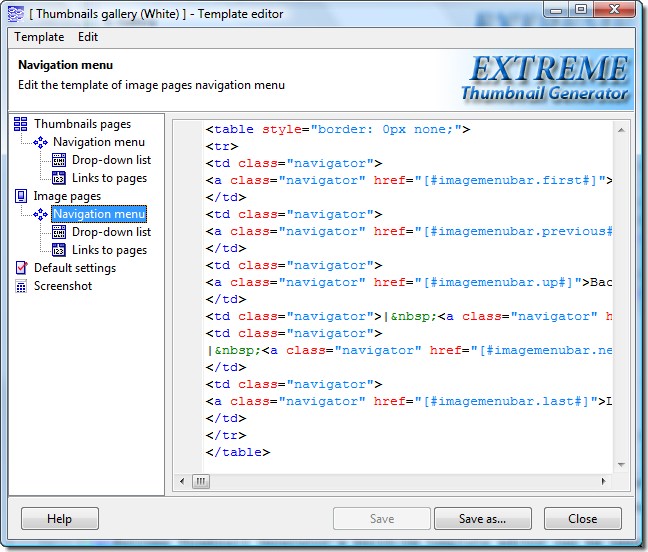
This is it! No other modifications required. Your template is ready to produce website HTML galleries with a slideshow feature.